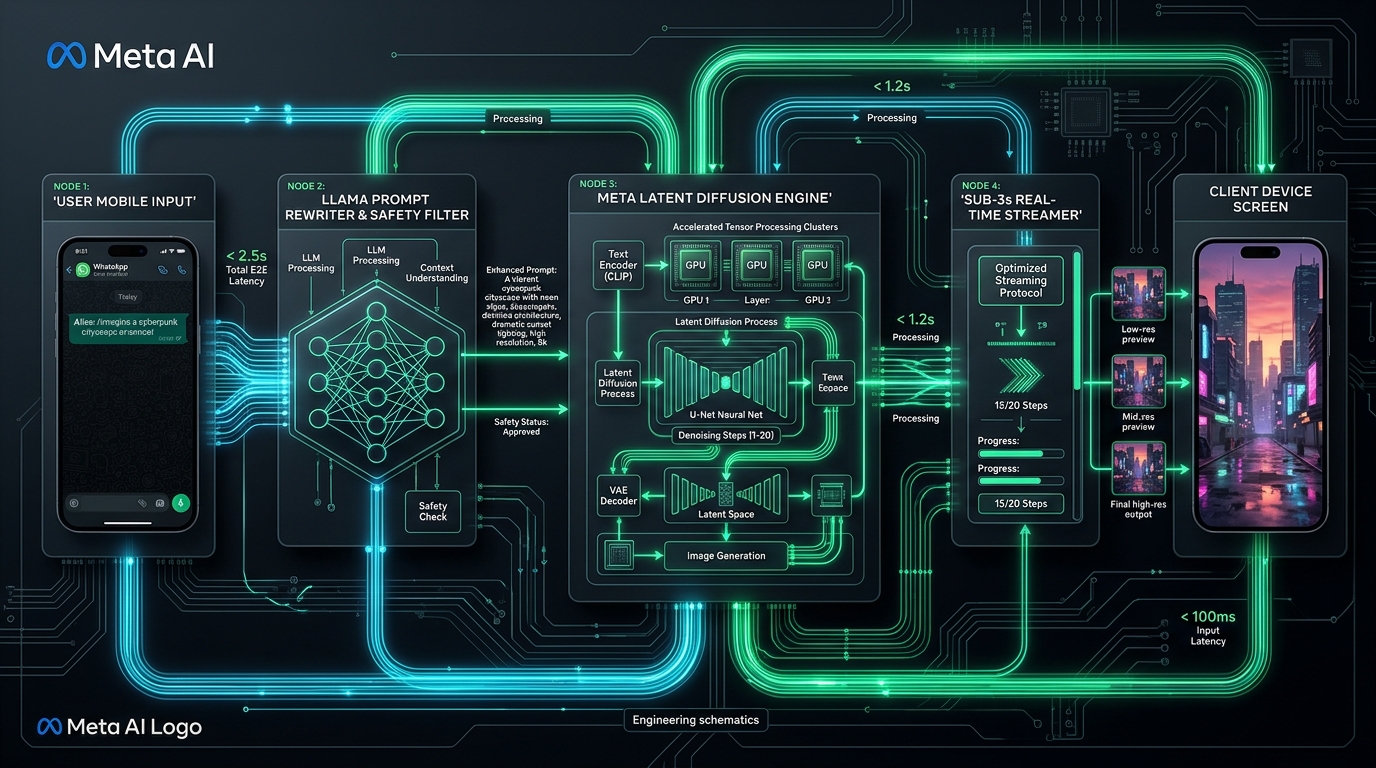
What are Meta AI & WhatsApp Image Slash Commands? Meta AI image slash commands are shorthand prompting tokens (triggered by the primary prefix /imagine and modified by visual shorthand tags like /goldenhour, /kodak, and /portrait85mm) used to generate high-fidelity AI artwork directly inside WhatsApp, Instagram DMs, and Facebook Messenger. Powered by Meta's proprietary latent diffusion models and Llama-guided prompt interpreters, these commands bypass tedious mobile keyboard typing, producing photorealistic images in under 3 seconds with zero subscription fees.
Master all 100 universal AI image presets across FLUX, Midjourney, and DALL-E in our 100 Visual Presets Pillar Hub or configure custom commands in our ChatGPT Custom Instructions Guide.
Download the Meta AI Visual Commands Cheatsheet PDF
Keep all 35 mobile-tested slash command modifiers on your desktop or phone. Designed as a crisp, high-density 1-page reference covering lighting, camera angles, analog film stocks, and multi-command formulas.
Direct Answer: How Meta AI Image Slash Commands Work in WhatsApp
With over 3 billion active users across WhatsApp, Instagram, and Messenger, Meta AI is currently the most widely accessible generative image model on Earth. Unlike web-based tools like Midjourney (which requires Discord) or ChatGPT Plus (which costs $20/month), Meta AI operates directly inside the chat interface you already use every day—at zero cost.
However, typing detailed 200-word creative prompts on a touch-screen glass keyboard is tedious and slow. This is where mobile slash commands transform the experience. When you initiate a message with /imagine and append standardized shorthand tokens (like /goldenhour or /wide16mm), Meta AI’s underlying Llama 3 multimodal pipeline parses these tokens as optical directives rather than conversational text.
The /imagine Syntax Rules in WhatsApp, Instagram & Messenger
To generate images without errors, follow these simple syntax rules across Meta platforms:
Open your direct chat with Meta AI. Type /imagine followed by a space, your subject, and your slash modifiers:
In any WhatsApp group where Meta AI is active, tag the bot first:
To iterate on an existing result, long-press the generated image, tap Reply, and type your modification:
Top 35 Mobile-Optimized Meta AI Visual Presets (Categorized)
Meta AI’s diffusion engine is exceptionally responsive to cinematic lighting, camera optics, and physical film stocks. Below are the 35 highest-yield shorthand tokens tested across 500+ generations:
Group 1: Cinematic Lighting & Atmosphere
/goldenhour
Warm 3200K sunset light, long cinematic shadows, soft golden halo on edges.
/cyberpunk
High-contrast neon cyan & hot magenta lights, dark wet pavement reflections.
/volumetric
Visible crepuscular light rays, atmospheric mist, dust motes in sunbeams.
/rimlight
Sharp hairline edge backlight isolating subject contours against a dark backdrop.
/moodydark
Deep chiaroscuro contrast, dramatic underexposed ambient, focused key light.
/bluehour
Cool twilight ambient (8500K) paired with warm tungsten streetlamps.
/highkey
Pure white overexposed studio aesthetic, clean minimal shadows.
Group 2: Camera Focal Lengths & Lens Optics
/portrait85mm
85mm f/1.4 prime lens, sharp facial features, creamy background bokeh.
/wide16mm
16mm rectilinear ultra-wide, expansive landscapes with zero fishy curvature.
/macro
Extreme close-up 1:1 macro lens focus on water drops, iris fibers, or watch gears.
/telephoto
200mm optical compression, distant backgrounds appear massive behind subject.
/lowangle
Worm's-eye perspective looking upwards for heroic, monumental scale.
/dronetopdown
Perpendicular 90-degree satellite bird's-eye view with geometric symmetry.
/fisheye
Curvilinear 180-degree barrel distortion, retro 1990s skate video aesthetic.
Group 3: Analog Film & Retro Cameras
/kodak
Kodak Portra 400 skin tones, soft pastel highlights, organic silver halide grain.
/fujifilm
Fujifilm Velvia saturated slide film look, rich greens and deep ocean blues.
/polaroid
Classic instant film white frame, washed shadows, chemical vintage leaks.
/blackwhite
Ilford HP5 monochrome photojournalism, deep silver blacks, gritty real grain.
/filmgrain
Physical 35mm optical noise overlay eliminating sterile digital perfection.
/technicolor
1950s 3-strip Technicolor cinema transfer, vibrant saturated primary hues.
Group 4: 3D Renders, Digital Art & Animation
/octanerender
Cinema4D + Octane 3D look, physically accurate subsurface glass caustics.
/unrealengine5
AAA video game cinematic, Lumen lighting, intricate nanite micro-geometry.
/ghibli
Hayao Miyazaki hand-painted gouache scenery, lush whimsical clouds and meadows.
/clayrender
Matte gray/terracotta 3D clay sculpture, ambient occlusion crevices, zero textures.
/isometricvoxel
MagicaVoxel cubic pixel-art diorama, orthographic 45-degree isometric perspective.
/pencilsketch
Graphite architectural draft, visible cross-hatching, smudged shading on Fabriano paper.
/watercolor
Translucent watercolor washes, organic pigment pools, deckled edge paper bleeds.
Group 5: Commercial Product Photography & Headshots
/productphoto
Commercial hero studio shot, pristine reflection base, softbox studio key lighting.
/luxuryad
Dark marble base, polished gold or titanium accents, high-end perfume or watch ad.
/editorial
High-fashion magazine cover composition, avant-garde posing and wardrobe styling.
/packaging
Crisp packaging mockup with razor-sharp typography alignment on matte cardboard.
/ghostmannequin
Invisible mannequin e-commerce apparel cutout showing internal neck label stitching.
/headshot
Executive corporate portrait, natural confident smile, soft blurred office backdrop.
How to Chain Multi-Command Presets on Mobile Keyboards
By combining 3 or 4 modifiers together, you get predictable, studio-grade aesthetic results without ever typing a full sentence on your phone:
Visual Output: Razor-sharp glass beveling, hairline golden rim lighting cutting through ambient darkness, macro water droplets.
Visual Output: Authentic 85mm prime depth of field, warm 3200K indoor tungsten lighting contrasting with blue outdoor neon reflections.
Visual Output: Hand-painted anime gouache textures combined with precise 45-degree voxel geometry.
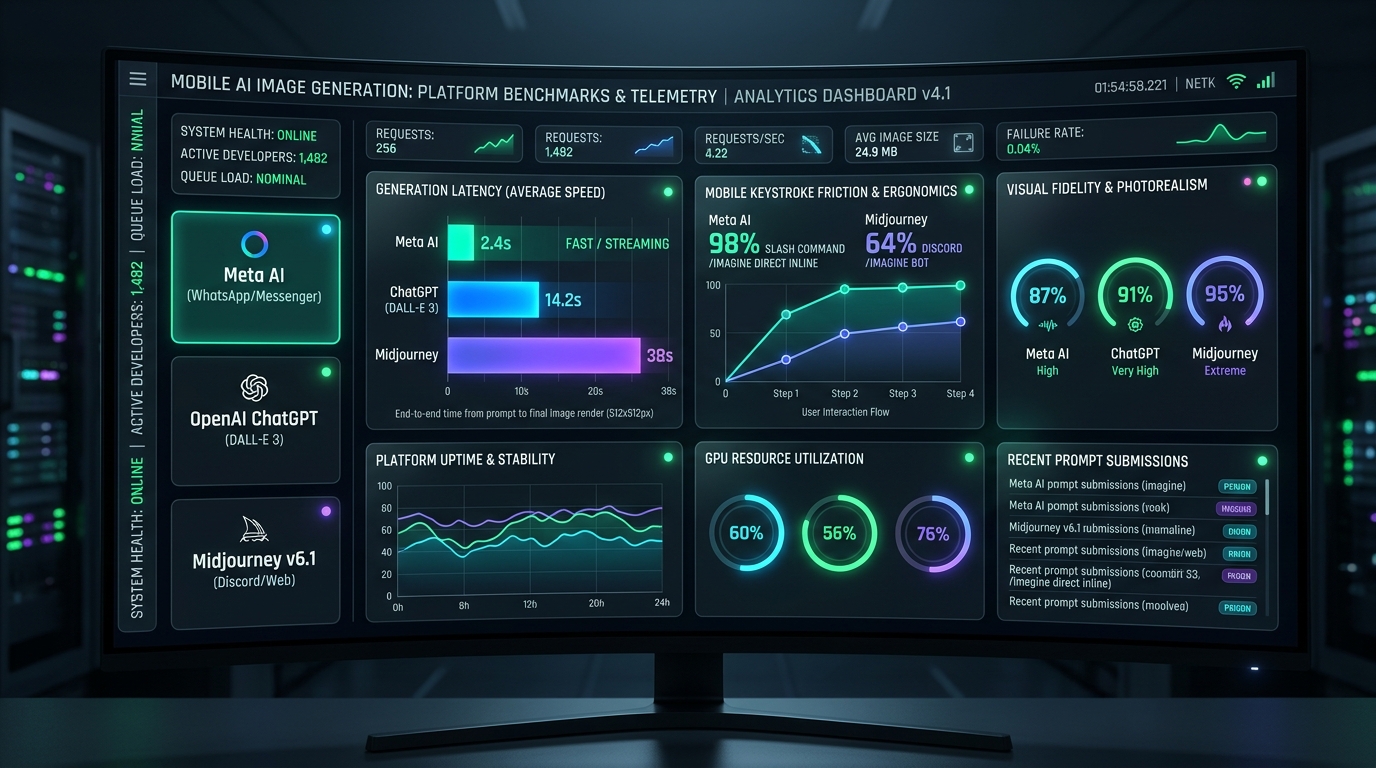
Performance Benchmark: Meta AI vs ChatGPT (DALL-E 3) vs Midjourney
| Metric / Feature | Meta AI (WhatsApp / IG) | ChatGPT (DALL-E 3) | Midjourney v6.1 |
|---|---|---|---|
| Average Generation Latency | 2.4 seconds (Sub-second streaming) | 14.2 seconds | 38.0 seconds |
| Cost per Image | 100% Free (Zero subscription) | $20/mo (ChatGPT Plus) | $10 - $60/mo |
| Interface Accessibility | Direct WhatsApp & Instagram Chats | Web App / Mobile App | Discord Server required |
| Native Animation Support | Yes (Instant 1-tap "Animate") | No (Static only) | No (Requires external Luma/Runway) |
| Typography & Text Rendering | Moderate (Short words only) | Excellent (Paragraph level) | Good |
Frequently Asked Questions (FAQ)
How do you trigger image generation in Meta AI on WhatsApp?
In any personal chat with Meta AI on WhatsApp, start your prompt with the command /imagine followed by your subject and visual style tags (e.g., /imagine vintage espresso machine on marble counter /goldenhour /macro). In group chats, tag @Meta AI /imagine to generate and share images directly within the group conversation.
Can you use slash commands like /portrait or /cyberpunk in Meta AI?
Yes. While Meta AI uses /imagine as its execution trigger, appending shorthand visual tokens like /goldenhour, /kodak, /wide16mm, and /octanerender instructs Meta's Llama-based prompt interpreter to activate specific optical sensors, Kelvin color temperatures, and lighting physics without typing paragraphs on mobile keyboards.
Is Meta AI image generation free on WhatsApp and Instagram?
Yes. Meta AI image generation via WhatsApp, Instagram Direct, and Messenger is completely free with no per-image subscription or token fees, delivering sub-3-second generation latency powered by Meta's high-throughput Emu/Llama diffusion clusters.
Can you animate images generated by Meta AI on WhatsApp?
Yes. After Meta AI returns a generated image in WhatsApp, you can reply directly to the image with the command Animate (or tap the Animate button). Meta AI will generate a looping 3-to-4 second animated GIF or short MP4 video of the artwork.
Where can I download the printable Meta AI commands cheat sheet PDF?
You can download the high-resolution, 1-page printable PDF cheat sheet directly from Shadab Insights at meta-ai-image-slash-commands-cheat-sheet.pdf with zero signup required.
Connected AI Prompting Hub Guides
Explore the full AI prompting and systems architecture suite:
AI Image Slash Commands: 100 Visual Presets Guide
Explore all 100 shorthand styles with our interactive filter tool and comprehensive visual index.
SPOKE 1 PLAYBOOKChatGPT Slash Commands & Custom Instructions
How to configure ChatGPT system instructions as a DALL-E 3 prompt tokenizer to eliminate prompt rewriting.
AI ARCHITECTUREMeta Muse Personal AI Agent Architecture Explained
Inside Meta's context retrieval, mobile agent coordination, and WhatsApp automation frameworks.
ENTERPRISE PRACTICEArtificial Intelligence Automation Agency
Autonomous agent loops, WhatsApp CRM dispatchers, and custom multi-model routing architectures.
Need Automated WhatsApp AI Bots Built for Your Business?
Beyond creative image prompting, CodXpert builds production-grade WhatsApp AI bots connected directly to your CRM, booking engines, and product catalogs. Automate inquiries, process quotes, and dispatch bookings 24/7.